What began as integrating a single camera gradually developed into a dedicated wildlife website with multiple live cameras, a video archive, HTTPS access, Loxone integration and a technically optimised streaming solution on the Synology.
Built with ChatGPT: The concept, configuration, troubleshooting, HTML/CSS/JavaScript files and the step-by-step development of this website were created and refined in dialogue with ChatGPT. Practical installation, real-world testing and feedback from the running system formed the basis for each next step.
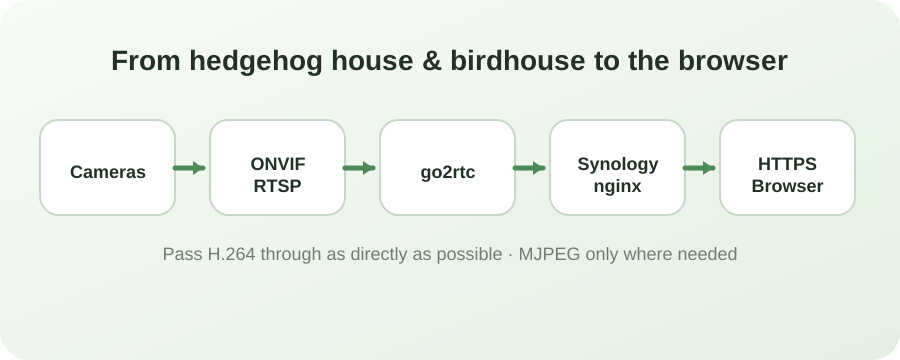
Cameras at the hedgehog house and birdhouseSynology NAS as the central hubThe data path from hedgehog house and birdhouse to the browserConcept development and troubleshooting with ChatGPT
Image rights: The website uses original camera images and custom-created symbol graphics. Third-party product photos with unclear usage rights are not published.
01
The first VIM TAG camera
The starting point was a VIM TAG camera at the hedgehog house. The goal was to use the camera image not only through the manufacturer app, but also on the local network and later in other systems.
The camera stream was discovered through ONVIF. One special feature quickly became apparent: the direct RTSP address contained a dynamic part and could change after a restart. A permanently entered RTSP URL was therefore not a reliable long-term solution.
02
go2rtc on the Synology
On the Synology, go2rtc was installed through Container Manager. Instead of hard-coding the changing RTSP address, go2rtc queries the camera via ONVIF and provides a stable local stream.
This created a fixed address on the NAS for further integrations while go2rtc absorbs changes to the camera’s internal URL.
03
Surveillance Station
The RTSP stream provided by go2rtc was then added to Synology Surveillance Station. After a camera restart, the connection remained stable – the key proof that the dynamic RTSP address was no longer a problem.
04
MJPEG for Loxone
The Loxone integration also required an MJPEG output. go2rtc generates a separate MJPEG stream from the camera feed, allowing the same camera to serve both RTSP/H.264 clients and systems that expect an MJPEG endpoint.
05
The second camera: Hedgehog House Interior
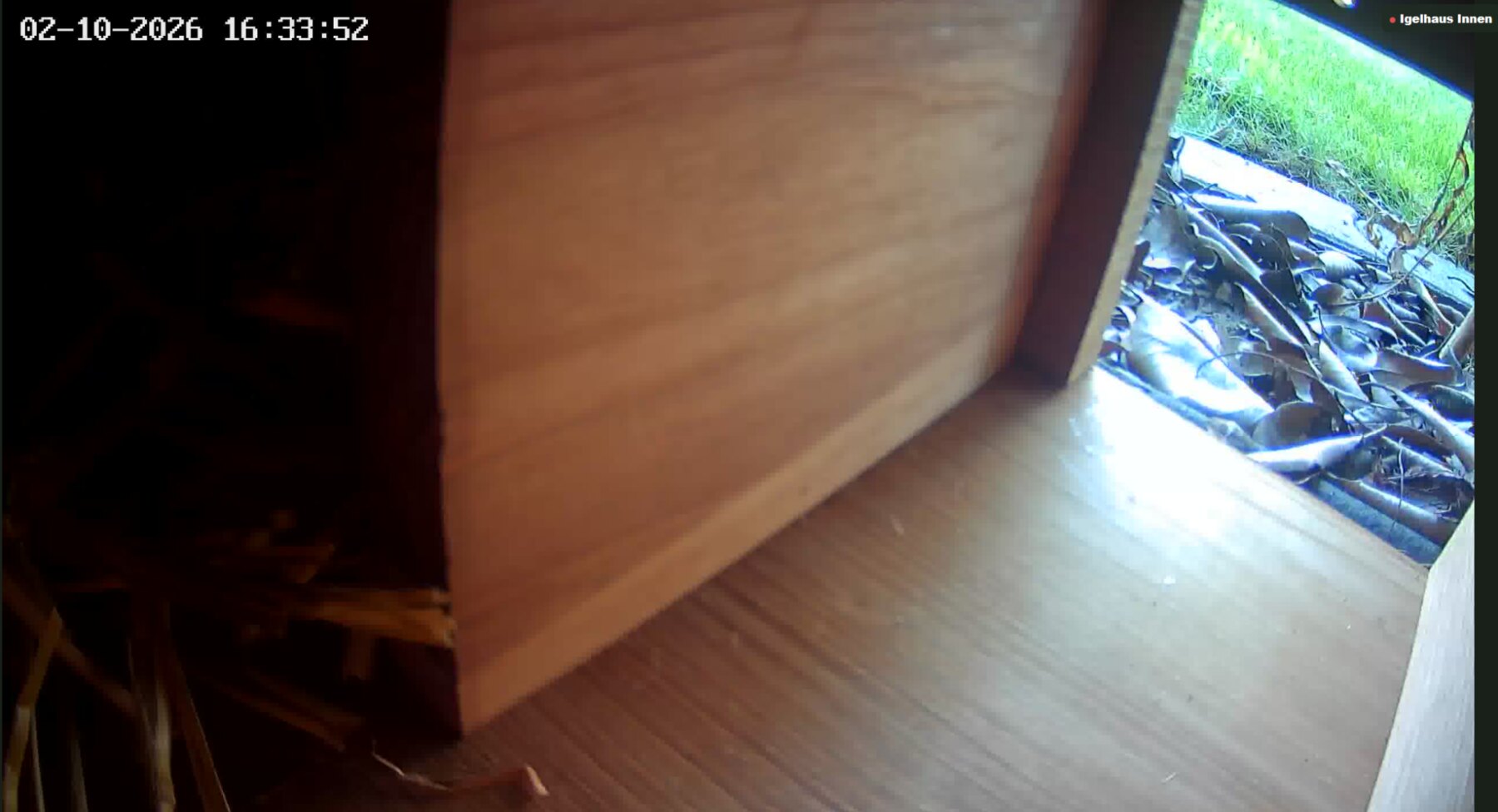
A second VIM TAG camera was added next. It was placed inside the hedgehog house and complements the exterior view with the entrance and interior area. ONVIF was initially disabled on this camera; after enabling it, the camera could also be integrated reliably through go2rtc.
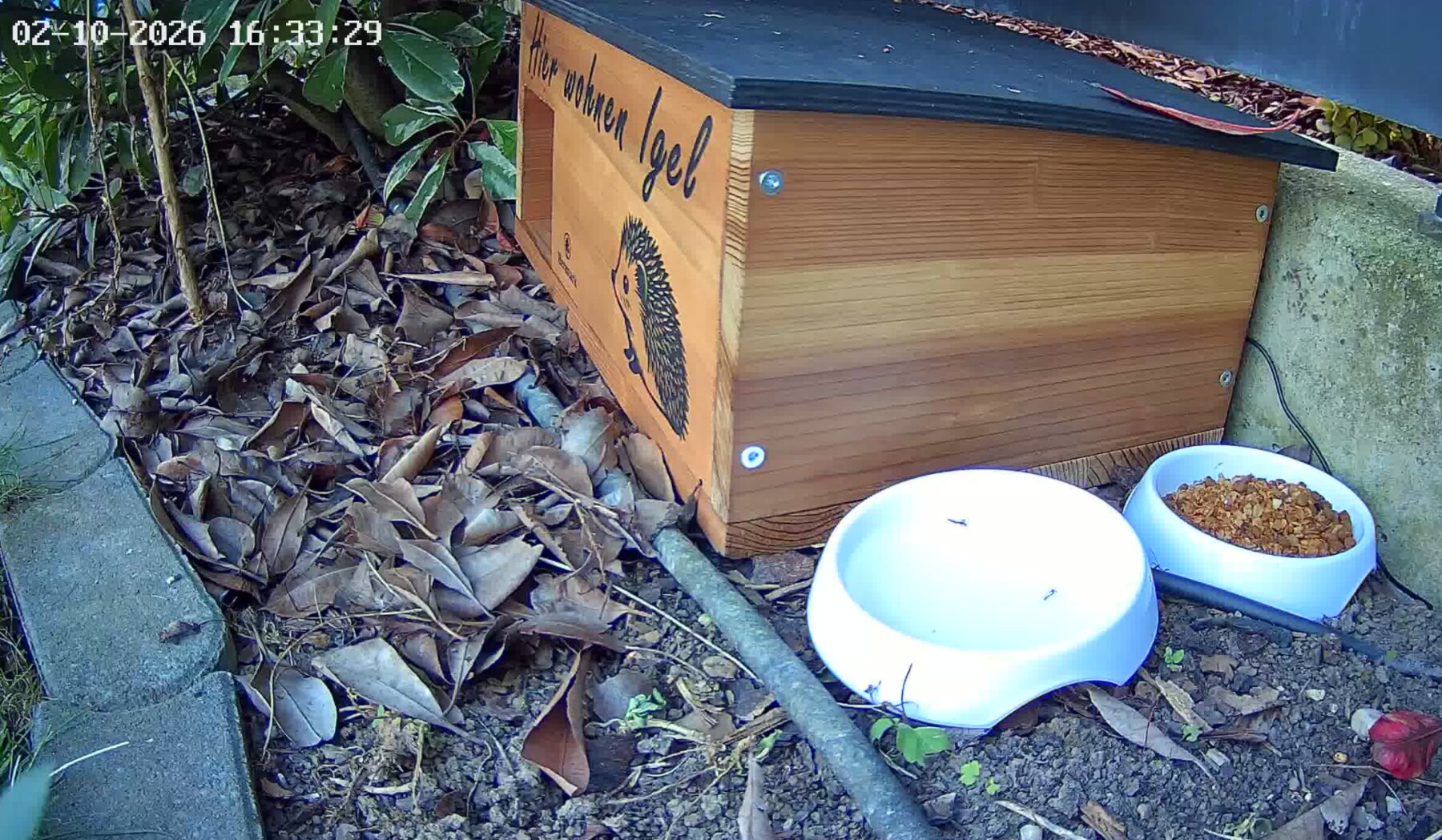
Since then there have been two perspectives: Hedgehog House Exterior for the house, entrance, food and water station, and Hedgehog House Interior for the sheltered interior area.
Hedgehog House Exterior – daytime viewHedgehog House Interior – daytime view06
A dedicated website on the NAS
A dedicated website was then created for the cameras. An nginx container on the Synology serves the HTML files. A simple camera view gradually developed into today’s website BöRu-Wildlife.
The interface was deliberately made brighter and friendlier. Responsive navigation, a home page, live view, video archive, project page, legal notice and privacy page were added.
07
Reverse proxy, domain and HTTPS
For external access, a reverse proxy was configured on the Synology. The domain wildlife.harald-boehm.at points to the web server in the container. A dedicated Let’s Encrypt certificate enables encrypted access via HTTPS.
An HTTP-to-HTTPS redirect was also configured. The cameras and go2rtc remain on the local network; only the required web interface is exposed externally.
08
Stream URLs with file extensions for Loxone
For Loxone, readable external camera addresses with the .mjpgextension were added. nginx receives these URLs and forwards them internally to the appropriate go2rtc MJPEG stream. This also makes the live view work through the external HTTPS access in Loxone.
09
Video archive
A dedicated video folder on the Synology was mounted in nginx. Selected MP4 recordings can therefore be displayed in the website video archive. New files placed in the folder become available to the site without building a new page for every video.
10
Mobile devices became a challenge
The first web versions also used MJPEG for browser live viewing. It worked in principle, but caused high CPU load on the NAS and behaved very differently across browsers. Safari and Chrome on the iPhone in particular sometimes showed the streams only after a long delay or not at all.
Edge and Firefox did not always behave identically either. It became clear that the website needed a more browser-friendly streaming solution.
11
Switch to H.264, MSE and HLS
The live view was fundamentally optimised. Instead of permanently generating MJPEG for every browser, the existing H.264 stream is forwarded as directly as possible. Desktop browsers preferably use MSE, while HLS is available for Apple mobile devices.
The result was clear: streams start much faster and NAS CPU usage dropped from nearly 100% at times to around 10% in observed operation. MJPEG is kept only where it is actually required, such as for Loxone.
12
Loading indicator, retry and full screen
Because a live stream can still take a moment to start, the interface received a loading indicator with the text “Please wait, loading...”. If a stream is unavailable, a new connection attempt can be started.
Each camera can be opened individually in a large view. A clearly visible back function was also added to full-screen mode so that operation remains simple on smartphones.
13
Project page and day/night views
The project page now documents not only the purpose of the hedgehog house but also the technical implementation. Daytime images show the camera views in colour, while night recordings demonstrate night vision.
The setup initially used two VIM TAG 2.5K Mini Wi-Fi outdoor cameras. The streams are received via ONVIF/RTSP, processed centrally by go2rtc and made available through Synology, nginx and HTTPS for the different applications.
Today, BöRu-Wildlife combines several originally separate components into one system: three cameras, go2rtc, Synology Surveillance Station, nginx, Synology reverse proxy, HTTPS, Loxone, browser live streams and an MP4 video archive.
The home page contains camera previews. The live page shows all streams together or individually, the project page explains the setup and technology, and this blog documents how the project developed step by step.
15
The home page becomes dynamic
The home page now automatically shows camera status, the latest published recording and the three newest videos from the archive. A day/night explanation, information about the hedgehog house and a privacy note for the camera areas were also added.
Videos and special recordings can be shared using the device’s sharing function. BöRu-Wildlife was also extended as a Progressive Web App: on supported devices, the website can be added to the home screen and launched like an app. Live images and videos deliberately remain online content and are not stored offline.
16
From hedgehog to bird
BöRu-Wildlife grows wings
What began with a view of a hedgehog house gains a new perspective: a third camera now observes the Birdhouse. This also changes the character of the project. The hedgehog cameras mainly show calm night-time scenes around the shelter, while the birdhouse adds a second world of observation shaped more by daylight and short visits.
The expansion was also a good test of the architecture behind BöRu-Wildlife. Instead of building a second system for the birdhouse camera, the existing platform could be reused. The new camera is integrated via ONVIF, go2rtc handles the stream and the existing website simply gains a third observation point.
A new chapter
Three cameras – two worlds of observation
With Hedgehog House Exterior, Hedgehog House Interior and Birdhouse BöRu-Wildlife now offers three live perspectives. The interesting part is not just the additional camera, but the contrast: hedgehogs at night, the birdhouse by day.
3Cameras2wildlife areas1platform
17
Tidying up behind the scenes
With the third camera, the internal stream names were standardised as well. The historically grown names became the clear identifiers igelhausaussen, igelhausinnen and vogelhaus. This makes it obvious from the configuration which stream belongs to which observation point.
Separate derived streams remain for applications that require MJPEG. The browser live view continues to use the more efficient H.264 path, so the NAS does not have to continuously recalculate images for every view.
18
A building block for more ideas
The birdhouse shows that BöRu-Wildlife has become more than a single camera page. Camera, stream server, NAS, web server and HTTPS access now form a small building block system. A new observation point can be integrated without rebuilding the existing hedgehog cameras.
Which perspectives might be added later is intentionally left open. The important point is that the technical foundation now allows the project to grow organically.
19
A day of refinement
With the third camera in place, the website itself was expanded as well. The complete interface is now available in German and English, including navigation, dynamic messages and separate language versions of technical graphics. German remains the default language, while DE/EN allows visitors to switch at any time.
The video archive was refined at the same time: recordings are read automatically from the NAS folder, the direct download option was removed from the interface, and shared links can point visitors directly to the relevant archive video.
20
Watermark, fullscreen and a cleaner live view
A subtle https://wildlife.harald-boehm.at watermark was added to live and archive video presentation. For the live overview it was deliberately hidden again so the three preview tiles show as much of the camera image as possible. The address appears in the large single-camera view, while camera labels in the previews were made smaller.
The watermark is rendered as a lightweight HTML/CSS layer above the image, avoiding additional video transcoding load on the NAS.
21
A new face for BöRu-Wildlife
With both hedgehog house and birdhouse now part of the project, the previous abstract app symbol no longer represented BöRu-Wildlife well. A new motif combining a hedgehog, bird, birdhouse and camera was therefore created. It is now used as the app icon, browser favicon and Apple touch icon, and also appears in the header.
Finally, the mobile header was refined so the logo and BöRu-Wildlife wordmark form one visually centred unit. This keeps the project recognisable even on small screens.
Technical path
From hedgehog house and birdhouse to the browser
VIM TAG cameras→ONVIF / RTSP→go2rtc→Synology NAS→nginx→Reverse Proxy / HTTPS→BöRu-Wildlife
In parallel, go2rtc supplies Surveillance Station and the MJPEG interface for Loxone. The same camera stream is therefore used in the form best suited to each target system.
◐
New appearance
Standard, Light, Dark and Auto
BöRu-Wildlife now has a project-wide appearance switcher. The existing green design remains the default. A brighter light scheme and a dark scheme are also available. Auto mode follows the current light/dark setting of the operating system and also reacts to scheduled system changes.
Today · Live statistics
From livestreams to our own visitor statistics
Another building block is a small statistics service running directly on the NAS. A separate Python container with SQLite counts visits, page views and currently active browsers. On the live page it also records which of the three cameras is currently open in the browser.
An external tracking provider was deliberately avoided: the statistics stay within the local system, do not permanently store IP addresses and still show how many people are currently using BöRu-Wildlife.
The site can now also show how often each livestream has been started and how many viewers are currently watching Hedgehog House Outside, Hedgehog House Inside or the Birdhouse.
Share BöRu-WildlifeShare the website with friends and anyone interested in wildlife.
 BöRu-Wildlife